
Issue
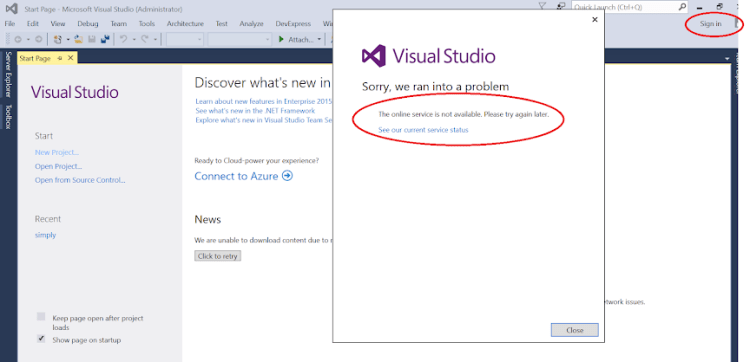
1. Visual Studio User account login failed when try to login.

Solution
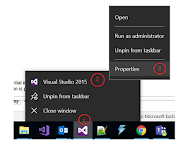
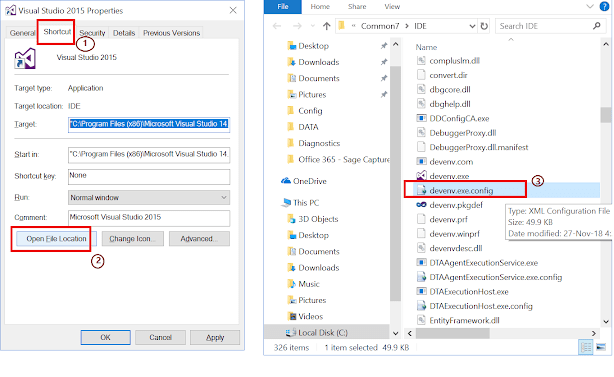
1. Right click on the visual studio > go to properties > shortcut tabs > click on Open File Location button and find “devenv.exe.config” open
2. Open devenv.config.exe and modify accordingly as below
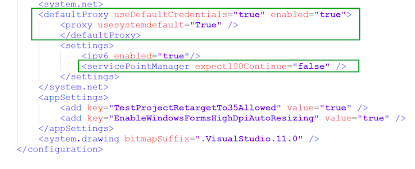
3. Add the below details under system.net section in devenv.exe.config file
<defaultProxy useDefaultCredentials=”true” enabled=“true”>
<proxy usesystemdefault=“true”/>
<ipv6 enabled=“true”/> <ServicePointManager except100Continue=“false”/>
4. Finally, Close Visual Studio and Open, Login with User account, No error.
 Arjun's Blog