There are still remote logins or linked logins for the server ‘linkedservername’

There are still remote logins or linked logins for the server ‘Linked server name’

Steps by Step 

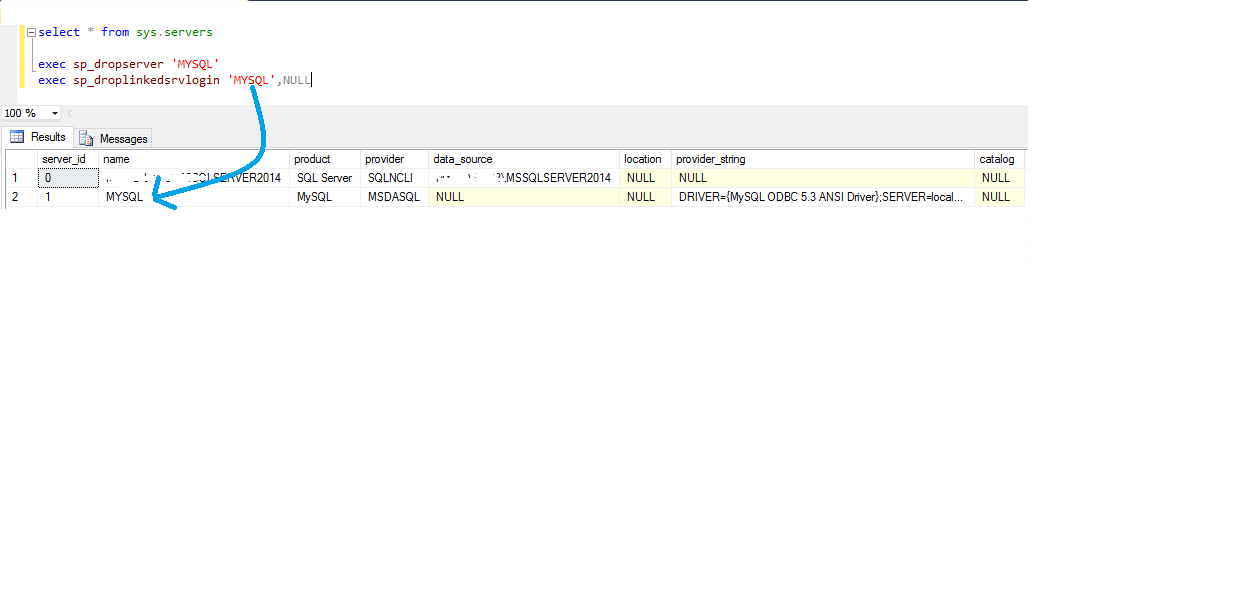
  1.  Open SQL Server Management Studio, Run (press F5) this query  SELECT * FROM sys.servers  Query returns all the linked servers created 
  2. Run ( press F5)  exec sp_dropserver ‘XXXX’    Replace XXXX with your linked server name  which is  the second column value of your step 1 query results
  3.  Run (press F5)   exec sp_droplinkedsrvlogin  ‘XXXX’,’YYYYY’   Replace XXXX with your linked server name  which is the second column value of your step 1 query results,  Replace YYYY with NULL
  4. That’s it. Now you will not receive error .
  5. Sample

Where to find SQL Server Configuration Manager?

SQL Server Configuration Manager


  1. Navigate to c:\windows\system32 and look for a file with the name SQLServerManagernn.msc, where nn is the version of SQL Server you have installed. For SQLServer 2014, the name is SQLServerManager12.msc. You can double-click on it and you’ll see a result. You can also make a shortcut on the desktop if you like.
  2. Easy way is to run the Computer Management from Control Panel→Administrative Tools→Computer Management, where you find the configuration manager installed

SQL Server 2016 C:\Windows\SysWOW64\SQLServerManager13.msc
SQL Server 2014 C:\Windows\SysWOW64\SQLServerManager12.msc
SQL Server 2012 C:\Windows\SysWOW64\SQLServerManager11.msc
SQL Server 2008 C:\Windows\SysWOW64\SQLServerManager10.msc

How to delete SQL Server Instance ?

How to delete SQL Server Instance ?

Remove SQL Server

To uninstall an instance of SQL Server 2008 R2

  1. To begin the uninstall process, from the Start menu, click Control Panel, and then double-click Add or Remove Programs.
  2. Select the SQL Server component to uninstall, and then click Change/Remove. This starts the SQL Server Installation Wizard.
  3. Setup Support Rules runs to verify your computer configuration. To continue, click OK.
  4. On the Select Instance page, use the drop-down box to specify an instance of SQL Server to remove, or specify the option to remove only the SQL Server shared features and management tools. To continue, click Next.
  5. On the Select Features page, specify the features to remove from the specified instance of SQL Server. 
  6. Removal rules runs to verify that the operation can complete successfully. If Setup detects SQL Server 2008 on this machine, you will see a warning. Uninstalling shared components could render the SQL Server 2008 instance unusable. For more information see Considerations for Side-by-Side Instances of SQL Server 2008 R2 and SQL Server 2008.
  7. On the Ready to Uninstall page, review the list of components and features that will be uninstalled.
  8. The Setup Progress page displays Setup status.
  9. On the Completing Setup page, click Close to exit the Installation Wizard.
  10. Repeat steps 2-9 until all SQL Server 2008 R2 components have been removed.

Where to find SQL Server Management Studio Icons?

SQL Server Management Studio Shortcut Icons

 SQL Server 2014 

C:\Program Files (x86)\Microsoft SQL Server\120\Tools\Binn\ManagementStudio\Ssms.exe

SQL Server 2012

C:\Program Files (x86)\Microsoft SQL Server\110\Tools\Binn\ManagementStudio\Ssms.exe

 SQL Server 2008 R2  

C:\Program Files\Microsoft SQL Server\100\Tools\Binn\VSShell\Common7\IDE\Ssms.exe

 older SQL Server 2005 

C:\Program Files\Microsoft SQL Server\90\Tools\Binn\VSShell\Common7\IDE\SqlWb.exe

Leaders

Leaders


Who is leader?  How to become a Leader?  What to study ?  

Every one CAN be an inspiring leader regardless of the places we live.  You CAN be.
As a writer I had a spark in me to search and get it what is it exactly Leader about.


Honesty Delegate | Communication | Confidence | Commitment | Positive Attitude | Creativity | Intuition | Inspire | Approach


1. Visibility  Exceptional leaders are seen, not just heard. Too many leaders today fail because they are too busy to be seen.
2. Manners  When someone has bad manners it overwhelms what we think of them.
3. Gaze  Eye contact that is direct, engaging, and steady is highly endearing. 
4. Space- Leaders command the space around them visually and physically.
5. Voice – Influential leaders have learned that a deeper resonating voice makes a big difference and the research backs that up. 
6. Gestures – The gestures of influential leaders are broad, smooth, frequent, and dramatic. 
7. Touch– Even in this day and age influential leaders employ touch.
8. Smile Leaders don’t hesitate to smile and know the disarming power of a smile. They smile to be social, to compliment, to greet, to diffuse tension, and to acknowledge others
9. Speed– Effective leaders act and move quickly because nothing communicates that you care more than acting swiftly. 
10. Communicate – Great leaders communicate effectively both verbally and non-verbally.

What does a great person do ?

Genius

They are mentally strong and have a relaxed mind.
They have control over their thoughts and behavior.
They are emotionally strong and don’t easily get excited or frustrated.
They listen more than they speak.
They have self-awareness and live in the moment.
They avoid useless arguments.
They know that not everyone will agree with them and they are open to other’s opinions.

The Art of Conversation

The art of conversation

1. Do not dominate a conversation or make it all about you. A monologue is not conversation.
2. Show interest and curiosity in others.
3. Strive for a balance of give and take.
4. Be an active listener by maintaining good eye contact and asking pertinent questions.
5. Train yourself to relax by using visualization, meditation, or other relaxation methods. Being relaxed is vital for good conversation.
6. Do not interrupt and cut in with your own ideas before the other person is finished speaking.
7. Maintain an open mind; everyone has a right to express themselves even if you don’t agree with what they are saying.
8. Although this is blur, try to avoid topics such as sex, religion and politics. You would be surprised at how  many people get trapped by them and end up in verbal battle, not conversation.
9. Be prepared by staying on top of the latest news, developments and world events.
10.Be approachable by staying relaxed, smiling and maintaining a friendly attitude.

Get what you want – Wikihow Search


Spoon Feeding  ( Need not to re-invent the wheel )

Have you ever wondered, however I google never got what I wanted. And most of the times google gives you more information still you seems to be not clear where it heading to which you have no idea what to do to get what you want exactly.

Imagine how easy if someone is assisting you step by step  to get what you want.

Here you go  Wikihow


Example : You want to know how to upload mp3 in iPhone ?

1.  Go to Wikihow website

2.  Type your question and click search

3.  Wikihow brings you the output with step by step help 

Demo


Design a site like this with WordPress.com
Get started